ChatGPT vs. Claude vs. Copilot: Which AI Tool Should Your Business Use?
Businesses everywhere are trying to answer the same question:
Should we use ChatGPT, Claude, or Microsoft Copilot?
It sounds like a simple technology decision. Compare the features, pick the winner, buy some licenses, and move on.
Except that’s probably the wrong question.
ChatGPT, Claude, and Copilot are all powerful AI tools. They also have different strengths, integrations, interfaces, and use cases. The AI model that works best for your marketing team may not be the one your IT team prefers. The best tool for analyzing a long document may not be the best fit for someone working all day inside Microsoft 365.
And six months from now, the answer could change again.
So instead of asking which AI model should win across your entire organization, there’s a more important question to answer:
How do you give employees access to the AI capabilities they need while maintaining control over your business data, users, permissions, and AI strategy?
That changes the conversation completely.
ChatGPT vs. Claude vs. Copilot: The Short Answer
There is no single best AI tool for every business.
ChatGPT, Claude, and Microsoft Copilot each have strengths depending on the employee, task, workflow, integrations, and business environment.
For many organizations, the better strategy is not choosing one AI model and forcing everyone to use it.
It is creating a managed AI environment where employees can access the right AI tools for the job while the business maintains centralized control over how AI is accessed, what data can be used, and which tools are approved.
In other words:
Your employees may need flexibility. Your business still needs control.
What Is ChatGPT Best At for Business?
ChatGPT has become the name many people associate with generative AI, and for good reason. It is a highly capable general-purpose AI assistant that can support a wide variety of business tasks.
Employees can use ChatGPT to brainstorm ideas, summarize information, draft content, analyze files, research topics, work through problems, generate code, prepare communications, and accelerate everyday knowledge work.
That versatility can make ChatGPT particularly useful when employees need one AI assistant capable of helping with many different types of tasks.
Business and enterprise versions also provide substantially different organizational and data protections than simply having employees create unmanaged personal accounts. That distinction matters.
But ChatGPT being a great AI tool does not automatically make it the best tool for every person, every department, or every workflow in your organization.
What Is Claude Best At for Business?
Claude has developed a strong following among professionals using AI for writing, analysis, coding, document-heavy work, and tasks involving substantial amounts of context.
Depending on the task and the model being used, an employee may prefer the way Claude interprets a long document, structures a response, works through a complicated problem, or handles a particular writing or development workflow.
That doesn’t make Claude universally better than ChatGPT.
It makes it different.
And that distinction is important.
When AI models are capable of approaching the same task differently, businesses should be cautious about building an entire AI strategy around the assumption that one model will always be the best choice.
What Is Microsoft Copilot Best At for Business?
For organizations already heavily invested in the Microsoft ecosystem, Copilot can be an obvious place to start.
Microsoft has been integrating AI throughout its business environment, including tools employees already use every day.
That can make Copilot particularly valuable when AI needs to become part of existing Microsoft workflows rather than something employees access in a completely separate application.
If your organization runs on Microsoft 365, that integration can be a significant advantage.
But there is still a difference between saying:
“Copilot works extremely well in our Microsoft environment.”
and:
“Copilot should be the only AI our employees ever use.”
Those are two very different decisions.
Your organization may discover that Copilot is the right fit for one workflow while ChatGPT, Claude, another model, or a specialized AI application performs better for another.
ChatGPT vs. Claude vs. Copilot: How Do They Compare?
AI changes too quickly for businesses to rely on a permanent scorecard. Features improve, models change, integrations expand, and new capabilities appear constantly.
A more useful way to compare these tools is to consider where each may fit within your organization.
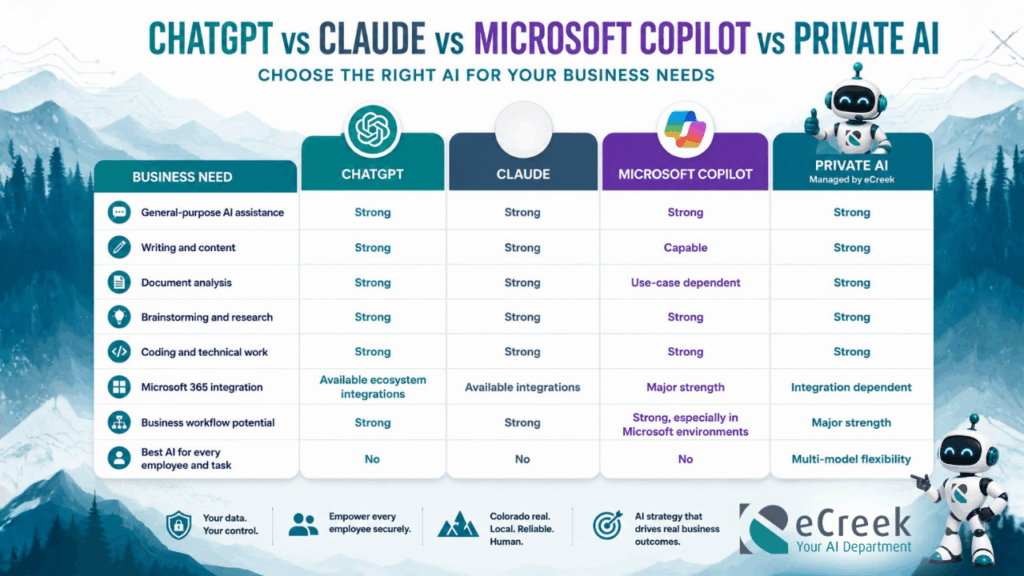
ChatGPT, Claude, Microsoft Copilot, and Private AI each have different strengths. Private AI gives businesses multi-model flexibility while providing greater control over AI access, workflows, and company data.
The important row is the last one.
There isn’t a universal winner.
And businesses shouldn’t necessarily want one.
The Problem With Choosing One AI for Your Entire Business
Imagine telling every department in your company that it has to use exactly the same software for every type of work.
Sales has one set of needs.
Marketing has another.
Operations has another.
Finance, HR, leadership, customer service, and IT all work with different information and different processes.
Why would AI be any different?
An employee might prefer Claude for one type of analysis, ChatGPT for another task, and Copilot when working inside Microsoft 365.
That’s not necessarily a problem.
In fact, access to multiple AI models can be an advantage.
The problem begins when every employee starts solving that need independently.
Shadow AI May Already Be Happening in Your Business
Your employees probably didn’t wait for an official company AI strategy before experimenting with AI.
Someone created a ChatGPT account.
Someone else prefers Claude.
Another employee discovered an AI tool on social media.
Someone is using Copilot.
Another person may have found a free AI application that leadership and IT have never heard of.
This is sometimes referred to as shadow AI: employees using AI tools for business purposes outside the organization’s approved technology environment, policies, or oversight.
And it creates an important question.
What information are employees putting into those tools?
They may be entering meeting notes, customer information, proposals, contracts, internal processes, spreadsheets, financial information, intellectual property, or other company data.
The problem isn’t that employees want to use AI.
The problem is that the organization may have little visibility into which AI tools are being used, which accounts are being used, what information is being shared, and what happens to that access when employees leave.
Telling everyone to stop using AI isn’t a realistic long-term strategy.
Giving everyone a corporate credit card and saying, “Go pick your favorite AI,” isn’t much of a strategy either.
There is a better middle ground.
The Bigger AI Question Isn’t Which Model Is Best. It’s Who Controls the Data.
Before deciding whether ChatGPT, Claude, Copilot, or another AI platform should become your company standard, ask some harder questions.
Which AI platforms are approved?
What company information can employees use with AI?
What information should never be entered into an unapproved AI system?
Who controls employee access?
Are employees using business accounts or personal accounts?
What happens to AI access when someone leaves the company?
Can leadership or IT manage the environment centrally?
Which AI applications can connect to company systems?
What happens when another AI model becomes better for a particular task?
These questions have less to do with which chatbot gives the best answer to a prompt.
They are questions about AI governance, security, data management, access, and business strategy.
That’s the difference between simply using AI and intentionally managing AI.
What If Your Business Didn’t Have to Choose Just One AI?
This is where the AI conversation becomes much more interesting.
Instead of thinking about AI like this:
Employee → Personal ChatGPT Account
Employee → Personal Claude Account
Employee → Copilot
Employee → Random AI Application
Think about creating an organizational layer between your employees and the rapidly changing AI ecosystem:
Employees → Managed AI Environment → Approved AI Models and Tools
Now your business doesn’t have to bet its entire AI strategy on whichever model happens to be leading today.
Employees can have access to multiple approved AI capabilities while the organization establishes clearer boundaries around how those capabilities are used.
This is the idea behind Private AI for business.
Private AI Gives Employees Choice While Giving Businesses Control
At eCreek, we deploy managed Private AI environments designed to give businesses a more controlled way to put AI into employees’ hands.
Rather than maintaining a growing collection of separate AI accounts, subscriptions, interfaces, and policies, your organization can create a centralized place for employees to work with AI.
eCreek’s Private AI solution is powered by Hatz AI and deployed and managed by our team.
The goal isn’t to lock employees into a single model.
It’s almost the opposite.
Different models are good at different things.
A managed AI environment can give employees access to multiple leading AI models while giving the organization greater control over access, permissions, approved tools, and data handling.
Multiple AI Models
Your organization doesn’t have to make one permanent bet on ChatGPT, Claude, or another model.
Employees can use different approved models when different capabilities make sense for the work they’re doing.
Centralized AI Access
Instead of employees creating accounts across multiple platforms, give them an approved place to start.
Centralization makes AI easier to manage and gives employees a clear answer when they ask, “What AI am I allowed to use?”
Organizational Controls
AI shouldn’t be governed entirely by individual employee decisions.
A managed environment can create clearer organizational control around users, permissions, tools, access, and data-handling practices.
Better Data Protection
Businesses need to know where their information is going.
Private AI creates clearer boundaries around how employees interact with AI and how business information is handled.
That doesn’t mean every major public AI service is inherently insecure. Enterprise and business versions of leading platforms can offer meaningful security and privacy protections.
The bigger issue is control.
Your business needs to decide which tools are appropriate, how they are configured, what information employees can use, and how AI fits into the organization’s broader security strategy.
Fewer Disconnected AI Subscriptions
One employee wants ChatGPT.
Another wants Claude.
Another wants a specialized AI application.
Soon, your organization isn’t managing an AI strategy. It’s managing a collection of subscriptions.
A managed environment can help reduce that sprawl.
AI Apps and Workflows
Most importantly, business AI should eventually become more than a chat window.
Once employees have a secure foundation, AI can start becoming part of the way actual work gets done.
AI Should Eventually Do More Than Answer Prompts
Chat is a great place to start with AI.
It shouldn’t necessarily be where your business stops.
At eCreek, we think about the progression in four stages:
ASK
This is where most businesses begin.
Employees ask AI to research, brainstorm, summarize, analyze, write, explain, and solve problems.
There can already be significant productivity gains here.
But AI knows only what you give it and what the underlying model can access.
The next step is making it more useful to your organization.
KNOW
What happens when AI can work with approved company knowledge?
Your documents.
Your processes.
Your internal resources.
Your policies.
Your business information.
Instead of employees repeatedly hunting through folders, applications, emails, and documentation, AI can begin helping them find and work with the knowledge they need.
DO
Once useful AI workflows become clear, you can turn them into repeatable applications.
Instead of every employee reinventing the same prompt, you can create AI-powered tools and workflows around tasks your organization performs every day.
AUTOMATE
Eventually, some of those workflows can become more automated.
AI agents and connected workflows can handle multi-step processes, move information between systems, prepare work for employees, and perform repetitive tasks—with human approval remaining at the points where it matters.
That’s when AI starts evolving from something employees talk to into something your business operates with.
Private AI Is Only Part of an AI Strategy
Deploying an AI environment solves an important problem.
It doesn’t solve every AI problem.
Technology without policies creates uncertainty.
Policies without employee training get ignored.
Training without useful workflows creates enthusiasm that fades.
Automation without governance can create risk.
That’s why eCreek approaches business AI as a broader organizational capability.
AI Governance: Establish the Rules
Employees need to know what they can and cannot do with AI.
Which tools are approved?
What information can be shared?
When does AI-generated work require human review?
How should confidential or customer information be handled?
eCreek helps organizations establish practical AI policies, approved-tool standards, data classifications, controls, and guidelines employees can actually follow.
AI Training: Teach Employees How to Use AI
Giving employees AI doesn’t mean they’ll automatically know how to use it well.
Different departments also need different skills.
Your sales team doesn’t use AI the same way your accounting team does. Leadership doesn’t have the same workflows as operations.
eCreek provides role-based AI training designed around the tools, people, and work already inside your organization.
AI Development: Build Around Your Business
Eventually, you may discover that the biggest opportunity isn’t another off-the-shelf AI subscription.
It is building something specifically around your workflow.
eCreek develops custom AI agents, internal applications, dashboards, management systems, and other AI-powered business tools designed around how an organization actually operates.
AI Automation: Connect the Systems You Already Have
Your CRM knows one thing.
Your accounting system knows another.
Your inbox knows something else.
And your employees are often the ones manually moving information between all three.
AI automation can help connect those systems, interpret information, prepare actions, and reduce repetitive work.
AI Hosting and Maintenance: Keep It Working
AI isn’t set-it-and-forget-it technology.
Models change. APIs change. Integrations break. Security requirements evolve. Business processes change.
AI systems need ongoing management just like the rest of your technology environment.
eCreek can provide hosting, monitoring, maintenance, troubleshooting, security, and optimization for custom AI applications, agents, integrations, and business AI environments.
How Should Your Business Choose an AI Strategy?
Instead of beginning with “Which chatbot should we buy?” start with your business.
Ask:
- What are employees actually trying to accomplish with AI?
- Which departments and roles will use it?
- What company information might employees need AI to work with?
- What information needs stronger protection?
- Which AI models work best for different use cases?
- How will users, permissions, and approved tools be managed?
- What AI governance policies are required?
- How will employees be trained?
- Which successful AI workflows could eventually become applications or automations?
- How will your AI environment adapt when models and technology change?
That last question is particularly important.
AI is moving too quickly to build a long-term strategy around whichever model happens to be “best” today.
Don’t build your AI strategy around today’s best model. Build an environment that can adapt as the models change.
So, ChatGPT, Claude, or Copilot?
Which one should your business use?
The answer may be:
ChatGPT.
It may be:
Claude.
It may be:
Microsoft Copilot.
And depending on your employees, systems, and workflows, the answer may be:
All of them.
The objective shouldn’t be to declare one AI model the winner and force every employee into it.
The objective should be giving your people the right AI capabilities for the work they’re doing while maintaining control over the things that matter to the business.
Your data.
Your users.
Your permissions.
Your systems.
Your policies.
Your workflows.
Your AI strategy.
The models underneath that strategy will continue to change.
Your control over the environment shouldn’t.
Give Your Employees AI Without Giving Up Control
Your employees don’t need a growing collection of disconnected AI subscriptions.
And your business doesn’t need to become an AI company overnight.
You need a practical place to start.
eCreek helps businesses move from random AI experimentation to intentional AI adoption.
We can help you deploy a managed Private AI environment, establish AI governance, train employees, connect AI to business knowledge, develop custom AI applications, automate workflows, and maintain the infrastructure behind it.
Start with secure AI access.
Learn where it creates value.
Then build from there.
Because the future of business AI probably isn’t about finding the one AI model that does everything.
It’s about creating an AI environment that gives your employees flexibility while keeping your business in control.
Frequently Asked Questions
Is ChatGPT or Claude better for business?
Neither ChatGPT nor Claude is universally better for every business. Both are powerful AI platforms, and the best choice depends on the task, employee, workflow, integrations, security requirements, and organizational strategy. Some businesses may benefit from providing access to multiple AI models instead of standardizing every use case on one platform.
Is Microsoft Copilot better than ChatGPT for businesses using Microsoft 365?
Microsoft Copilot can be particularly valuable for organizations heavily invested in Microsoft 365 because of its integration with Microsoft’s business ecosystem. However, that doesn’t automatically make it the best AI for every task. Other models may provide advantages for specific workflows, which is why businesses should evaluate AI based on use case rather than selecting one tool for everything.
Can a business use multiple AI models?
Yes. A business can use multiple AI models, and doing so may provide employees with more flexibility for different tasks. The challenge is managing those tools, accounts, permissions, data practices, and policies. A managed Private AI environment can help centralize access to multiple approved AI models.
Is it safe for employees to put company data into ChatGPT or Claude?
It depends on the specific platform, account type, configuration, information involved, and your organization’s policies. Business and enterprise AI products can provide data protections that differ significantly from unmanaged consumer accounts. Organizations should establish clear policies defining approved AI tools and what types of company information employees are permitted to use with them.
What Is Private AI for business?
Private AI gives an organization a managed environment for using AI with greater control over access, approved tools, permissions, data handling, and usage. Rather than relying on employees to independently choose and manage AI accounts, the business establishes an approved environment for AI.
What is shadow AI?
Shadow AI generally refers to employees using AI tools or applications for work without formal organizational approval, management, or governance. This can create challenges involving data handling, security, compliance, account management, inconsistent practices, and visibility into how AI is being used.
Does Private AI mean we can’t use ChatGPT, Claude, or other AI models?
No. Private AI does not necessarily mean committing to a single private model or eliminating access to leading AI models. One of the advantages of a managed approach is the ability to give employees access to multiple approved AI capabilities while maintaining greater organizational control over how those capabilities are used.
How can a business control employee AI use?
Businesses can create AI acceptable-use policies, classify sensitive information, establish approved AI tools, manage employee access, provide AI training, monitor organizational usage where appropriate, and deploy managed AI environments. Technology and governance should work together so employees have both useful AI capabilities and clear boundaries.
Should every employee have access to AI?
Not necessarily in exactly the same way. AI access should reflect an employee’s role, responsibilities, data access, and business needs. Some employees may need general AI assistance, while others may require specialized tools, company knowledge, integrations, or automated workflows.
How should a business get started with AI?
Start by assessing how employees are already using AI, what business problems they are trying to solve, which information is involved, and where AI could create measurable value. From there, establish governance, determine appropriate AI access, train employees, and gradually expand into company knowledge, applications, integrations, agents, and automation.